Features available by enabling WAF log integration
AWS WAF ClassicAWS WAF v2Old PlanNew PlanAdvancedLegacyFeature / Spec.
Overview
You can use the four features listed below by enabling WAF log integration.
- Blocked status on the Dashboard page
- WAF log search feature
- Monthly report feature
- WAF log alert (detection notification) feature
Differences in configurations based on AWS WAF version and rule policy
The available WAF log integration method and features vary based on your AWS WAF version and rule policy.
AWS WAF v2 Advanced
WAF log retrieval | Blocked status on the Dashboard page | WAF log search feature | Monthly report feature | WAF log alert (detection notification) feature | Filtering feature for WAF log alerts (detection notifications) | WAF log retention period |
|---|---|---|---|---|---|---|
The new method | Available | Available | Available | Available | Available | Available |
The old method (Lambda method) | Not applicable | Not applicable | Not applicable | Not applicable | Not applicable | Not applicable |
Note: Dynamic denylist feature will also be enabled if you are using the Advanced rule policy. Please refer to About the Denylist for more information.
AWS WAF v2 Legacy
WAF log retrieval | Blocked status on the Dashboard page | WAF log search feature | Monthly report feature | WAF log alert (detection notification) feature | Filtering feature for WAF log alerts (detection notifications) | WAF log retention period |
|---|---|---|---|---|---|---|
The new method | Available | Available | Available | Available | Available | Available with new plan only |
The old method (Lambda method) | Not available | Not available | Available | Available | Not available | Not available |
Note: The WAF log retention period settings are available only with the new plan. For details, see About WAF Log Retention Period.
AWS WAF Classic Legacy
WAF log retrieval | Blocked status on the Dashboard page | WAF log search feature | Monthly report feature | WAF log alert (detection notification) feature | Filtering feature for WAF log alerts (detection notifications) | WAF log retention period |
|---|---|---|---|---|---|---|
The new method | Available | Available | Not available | Not available | Not available | Not available |
The old method (Lambda method) | Not available | Not available | Available | Available | Not available | Not available |
Blocked status on the Dashboard page
Please refer to the About the Dashboard page.
About the WAF log search feature
This is a feature to search the WAF logs WafCharm retrieved if you have WAF log retrieval enabled.
You can access the WAF log search feature by clicking [Log] under the [Analytics] on the left menu.
How to use
The top panel is the search feature, and the [Log List] panel at the bottom shows the search results.
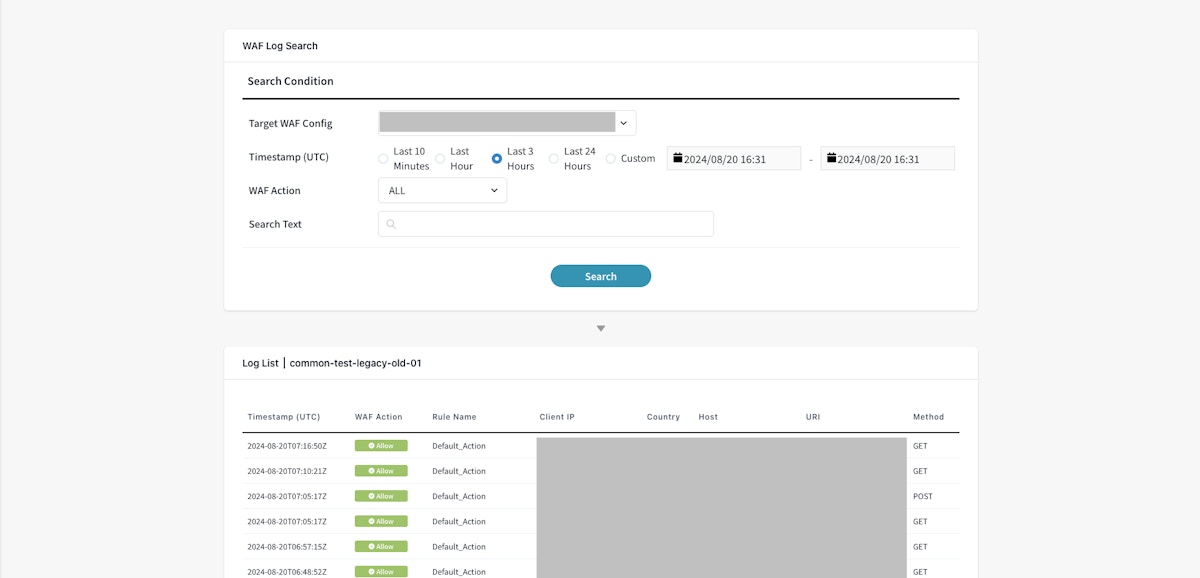
The features listed below are included in the search tool.
- Target WAF Config: You can specify the target WAF Config.
- Timestamp (UTC): You can specify the time to search. If you choose [Last 10 minutes], it will search the WAF logs within the last 10 minutes from the current time. If you want to search WAF logs in other time frames, use the [Custom] option to specify the time.
- WAF Action: You can select the executed action from Allow, Block, CAPTCHA, and Challenge. If you want to search from all actions, select [ALL]. Count action cannot be used to search actions.
- Search Text: You can enter the strings you want to search. The entered text will be searched against the values in rule name, client IP, country, host, URI, method, and action.
Example: If you enter "JP" in the [Search Text], WAF logs with "JP" as a value in the Country key will match. If you search with a specific IP address, only WAF logs that contain the searched IP address in the Client IP will be matched.
After you enter the items above and click the [Search] button, the search results will be shown under the [Log List] panel.
The numbers shown at the bottom of the [Logs] panel (displayed as “1–1” in the screenshot) indicate the current display range and the total number of results that match the search conditions. When “1–1” is displayed, it means that there is one matching result, and that the first (and only) result is currently being shown.
Up to 100 results can be displayed per page. When the total number of matching results exceeds 100, the range is shown in the format [start index]–[end index] | [total count]. The [start index]–[end index] represents the range of results currently displayed. When you move to the second page or later, this range changes accordingly, for example to “101–200”. The [total count] represents the total number of results that match the search conditions. For example, if 263 results match the search, the first page will display “1–100 | 263”.
Please note that the total number of matching results does not represent the actual number of requests or the number of blocked requests. It indicates only the total number of WAF logs that match the specified search conditions within the currently searchable range of WAF logs.
About the Log List results
When you click on one of the results, a panel showing the details of the search result will appear on the right side.
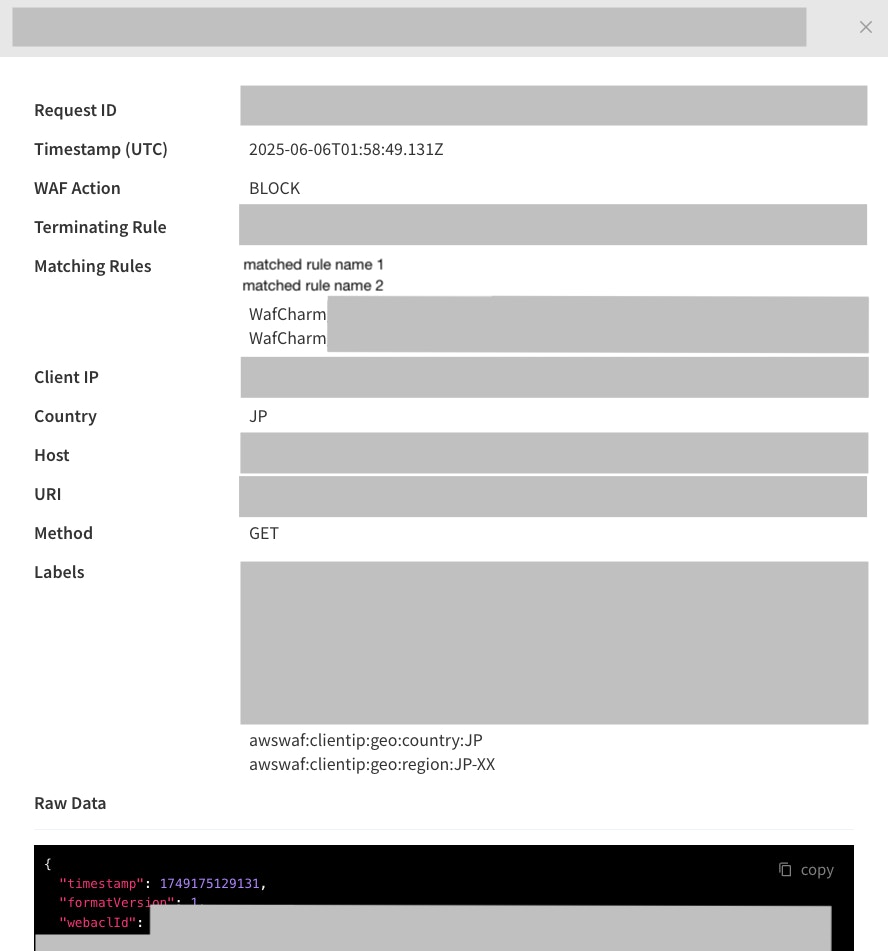
- Request ID: This is a value from the
requestIdavailable in the WAF log. - Timestamp (UTC): This is a value from the
timestampavailable in the WAF log. - WAF Action: This is a value from the
actionavailable in the WAF log. - Terminating Rule: This is a value from the
terminatingRuleIdavailable in the WAF log. - Matching Rules: This is a value from the ruleId in
nonTerminatingMatchingRulesorexcludedRulesfields in the WAF logs that matched with an action Count. - Client IP: This is a value from the
clientIpavailable in the WAF log. - Country: This is a value from the
countryavailable in the WAF log. - Host: This is a value from the
Hostheader available in the WAF log. - URI: This is a value from the
uriavailable in the WAF log. - Method: This is the value from the
httpMethodavailable in the WAF log. - Labels: This is a value from the
labelsavailable in the WAF log. - Raw data: JSON format raw data of the searched WAF log. You can click the [copy] button in the top right corner to copy the whole data.
Limitations and Notes
- All values searched and displayed in the WAF log search feature are the values from the WAF logs.
- Please refer to the Log fields page in the AWS document for more details on the values available in WAF logs.
- The [WAF Action] and [Action] fields in the WAF log search feature are based on the
actionfield in the WAF logs. Theactionfield in the WAF log contains only the terminating action that AWS WAF applied to the request. The possible values are Allow, Block, CAPTCHA, or Challenge.- Because the action field does not contain the value Count, counted requests cannot be searched based on the Count action.
- WafCharm uses WAF logs downloaded from your S3 bucket, so the features will not use the WAF logs saved on the S3 bucket in your AWS environment.
- It will take 5-10 minutes for WafCharm to download WAF logs using the WAF log retrieval method (the new method). If WAF logs of the day are saved on your S3 bucket, it should not affect WAF log-related features provided by WafCharm.
- Depending on your WafCharm account settings, the number of WAF logs you can view may be limited (this does not affect the monthly report feature or WAF log alerts). For details, see About WAF Log Retention Period.
About the monthly report feature
The monthly report feature aggregates WAF logs transferred based on registered WAF Config and creates a monthly report at the beginning of each month.
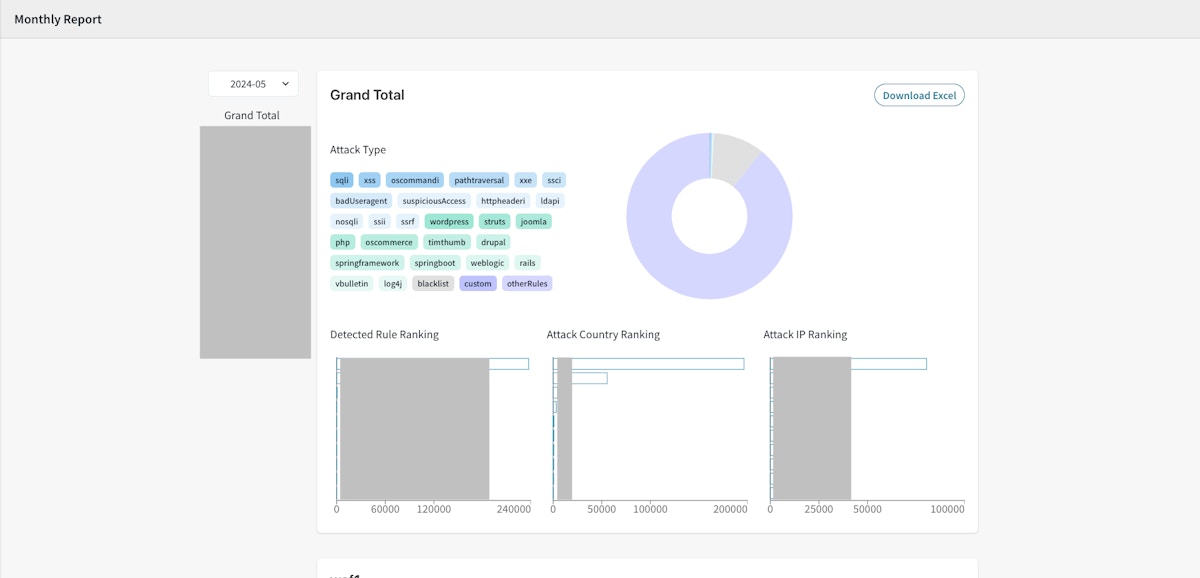
The monthly report can be viewed from the [Report] link on the left menu.
The monthly report contains the information below.
- Attack Type
- List of attack types.
- Click on the attack type tag to filter data to aggregate in the pie chart.
- Pie chart based on attack types
- Pie chart based on aggregated attack types from the detected or blocked WAF logs.
- Detected Rule Ranking
- A top 10 ranking based on the detected rules.
- Attack Country Ranking
- A top 10 ranking based on country of origin.
- Attack IP Ranking
- A top 10 ranking based on the detected IP addresses.
How to export the monthly report data in Excel format
You can download the data from each report by clicking on the [Download Excel] button in the top right corner.
The Excel sheet will contain all data available on the report. For example, if you download the Excel data from the [Grand Total] report, you can get the data of all web ACLs, and if you download the Excel data from a specific WAF Config's report, you can get the data of that specific WAF Config.
You can also see all the data, such as the numbers, shown as a tooltip when you hovered on the report. You can use the downloaded data to adjust how you visualize the data.
Limitations and Notes
- The monthly reports are created based on last month's WAF logs.
- The monthly report feature cannot download past WAF logs or use untransferred WAF logs.
- The monthly report cannot be recreated after the initial creation is completed.
- If AWS WAF cannot determine which country the IP address originated from, the monthly report may show a hyphen
-instead. - The following effects may occur depending on the log filtering settings configured in AWS WAF.
- If you filter WAF logs to only save logs with action: Block
- Only WAF logs with blocked requests are available, so the monthly report and detection notification operate based on the blocked logs.
- If you filter WAF logs to only save logs with action: Count
- Please note that the Count action defined in a rule and Override to Count are treated differently by AWS. Depending on the rule action being used, this may cause the detection notification feature and monthly reports to behave unexpectedly.
- If you filter WAF logs to only save logs with action: Block
- For accounts with Limited policy applied, only the monthly reports for authorized WAF Configs are visible. The Grand Total and monthly reports for unauthorized WAF Configs are not displayed.
About the WAF log alert (detection notification) feature
The WAF log alert setting is a function that sends detection notification emails to specified email addresses when WAF log integration (either the old or new method) is configured and the feature is enabled. It corresponds to the Notification page in the old WafCharm Dashboard.
About filtering notification contents
This option is used to filter the notification details included in WAF log alert emails. It is available only when WAF log integration is configured using the new method in AWS WAF v2.
The following items can be configured for this option.
- Alert Conditions
- Notify Block and Count logs: WAF log information for requests that were blocked or detected only under the Count action will be included in the detection notification emails.
- Notify Block logs only: WAF log information for requests that were blocked will be included in the detection notification emails. Information for requests detected only under the Count action will not be included in the detection notification emails.
- Denylist and Dynamic Denylist Notifications
- Notify: When a request is detected by the Denylist or Dynamic Denylist rules, WAF log information for that request will be included in the detection notification emails.
- Do not notify: When a request is detected by Denylist or Dynamic Denylist rules, WAF log information for that request will not be included in the detection notification emails.
The differences between Block logs and Count logs are as follows.
- Block logs: WAF logs for requests that were ultimately blocked.
- Count logs: WAF logs for requests that matched a rule with the Count action but were ultimately allowed.
Block logs also include information for requests that matched rules with the Count action; however, as a classification of WAF logs, they are categorized as "Block logs."
The notification behavior for each setting is as follows.
Alert Conditions | Denylist and Dynamic Denylist Notifications | Logs included in notifications | Notification behavior | Values listed under Matches Rule Name |
|---|---|---|---|---|
Notify Block and Count logs | Notify |
| Notify all Block and Count logs regardless of matched rules | nonTerminatingMatchingRules.ruleId terminatingRule.ruleId excludedRules.ruleId |
Notify Block logs only | Notify |
| Notify all Block logs | nonTerminatingMatchingRules.ruleId terminatingRule.ruleId excludedRules.ruleId |
Notify Block and Count logs | Do not notify |
| Notify only Block and Count logs detected by rules other than Denylist or Dynamic Denylist rules Note: WAF logs that include detections by Denylist or Dynamic Denylist rules are excluded from notifications. | nonTerminatingMatchingRules.ruleId terminatingRule.ruleId excludedRules.ruleId |
Notify Block logs only | Do not notify |
| Notify only when a request is blocked by rules other than Denylist or Dynamic Denylist rules Note: Requests blocked by Denylist or Dynamic Denylist rules are excluded from notifications. | nonTerminatingMatchingRules.ruleId terminatingRule.ruleId excludedRules.ruleId |
Note: The values listed under Matches Rule Name (the names of detected rules) in the detection notification correspond to the values of nonTerminatingMatchingRules.ruleId, terminatingRule.ruleId, or excludedRules.ruleId in the WAF logs. Rule names are not subject to filtering, so the listed content does not change based on the settings.
Notification details
Notification details of the WafCharm Notification
- Email Title: WafCharm Attack Detected.
- Email From: WafCharm Notification
wafcharm-notification@cscloud.co.jp - Email To: WafCharm Notification
wafcharm-notification@cscloud.co.jp - Email BCC to: Email addresses registered under WAF log alert
Attacks as follows were detected.
This report includes up to 10 attacks detected in every buffer interval.
If you need to check more information and attacks, visit your AWS console.

Web ACL Name (Web ACL ID): < your web ACL's name > (< your web ACL ID >)

Matches Rule: wafcharm-blacklist-010090004-07 (<Rule ID>)
Time(UTC): Thu, 01 Apr 2020 20:20:00 GMT
Source IP: XXX.XXX.XXX.XXX
Source Country: JP
URI: /
Request ID: <Request ID of the corresponding WAF log (AWS WAF v2 only)>

You may add/delete the email address to receive the detection notifications from the link below (login needed).
<URL to your WAF Config>
Items listed on the notification email
- Time (UTC): This is a timestamp value from the WAF log converted to UTC format.
- Source IP: This is a value from the clientIp in the WAF log. The referenced value does not change even if you are using the IP address in the header for Allowlist/Denylist.
- Source Country: This is a value from the country in the WAF log.
- Action: This is a value from the action in the WAF log.
- URI: This is a value from uri in the WAF log.
- Request ID: This is a value from requestId in the WAF log. Only available for AWS WAF v2. This information is not available for AWS WAF Classic.
- Query String: If the request contains a query string, this is a value from args in the WAF log.
Notification details of the Managed Rules Notification
This feature is only available if you are using WafCharm and CSC's Managed Rules together on AWS WAF Classic.
- Email Title: CSC Managed Rules Attack Detected.
- Email From: WafCharm Notification
wafcharm-notification@cscloud.co.jp - Email To: WafCharm Notification
wafcharm-notification@cscloud.co.jp - Email BCC to: Email addresses registered under WAF log alert
Attacks as follows were detected.
This report includes up to 10 attacks detected in every buffer interval.
If you need to check more information and attacks, visit your AWS console.

Web ACL Name (Web ACL ID): < your web ACL's name > (< your web ACL ID >)

Managed Rule: Cyber Security Cloud Managed Rules for AWS WAF -HighSecurity OWASP Set-
Attack Type: suspicious_access
Field Type: url
Matches Rule Name: sample_suspicious_access-url-001
Matches Rule ID:<Rule ID>
Time(UTC): Thu, 1 Apr 2020 20:20:00 GMT
Source IP: XXX.XXX.XXX.XXX
Source Country: JP
URI: /

You may add/delete the email address to receive the detection notifications from the link below (login needed).
<URL to your WAF Config>
Notes
- Each email (log file) contains details of a maximum of 10 detections.
- The notification interval depends on the WAF log output interval.
- For the S3 bucket option, the interval is 5 minutes.
- For the Amazon Data Firehose option, it depends on the values specified in the buffer interval and buffer size.
- If you have registered WAF Configs (web ACLs) for different AWS WAF versions (Classic or v2) on WafCharm and wish to use this feature for both WAF Configs, please do not use the same Lambda.
- The index.mjs used by Lambda is different for AWS WAF Classic and AWS WAF v2. If you use the wrong version, the WAF log transfer will fail.
- The following effects may occur depending on the log filtering settings configured in AWS WAF.
- If you filter WAF logs to only save logs with action: Block
- Only WAF logs with blocked requests are available, so the monthly report and detection notification operate based on the blocked logs.
- If you filter WAF logs to only save logs with action: Count
- Please note that the Count action defined in a rule and Override to Count are treated differently by AWS. Depending on the rule action being used, this may cause the detection notification feature and monthly reports to behave unexpectedly.
- If you filter WAF logs to only save logs with action: Block
- The filtering option is not available for AWS WAF Classic.